Importing Groups from KAMAR
Exporting student data from Kamar School Management System
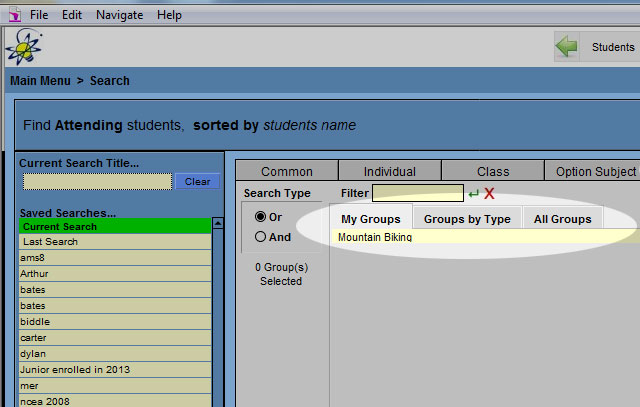
From the main screen go to [Printing] > [Export] > [Group Tab]
You can choose from My Groups if you setup the groups or select Groups by Type > Sport > Select Sports, if someone else setup the groups.
The fields you need to export should match the entry form
The easiest way to do this is setup a search that exports all data, and save that search so you don't have to select the fields all the time. Then export the data to csv/xls file and delete the columns you don't need
These fields should cover most of what is required
- Student ID (Should already be selected)
- First Name (Should already be selected)
- Surname (Should already be selected)
- General > Gender
- Date > Date of Birth
- Date > First Attendance
- Timetable > Year Level
- Ministry > Previous School 1 Name
- Caregivers > PCG One Name (eg. Mother)
- Caregivers > PCG One Phone Home (eg. Mother)
- Caregivers > PCG One eMail (eg. Mother)
Click [ Export] and save the file.

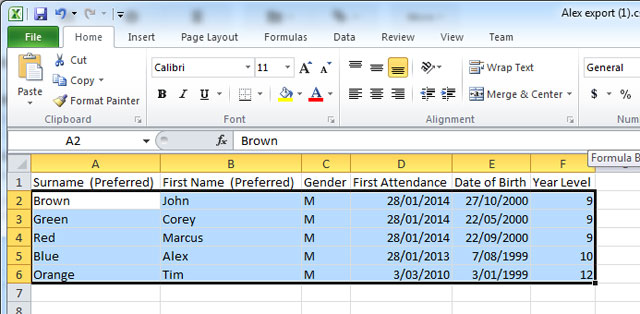
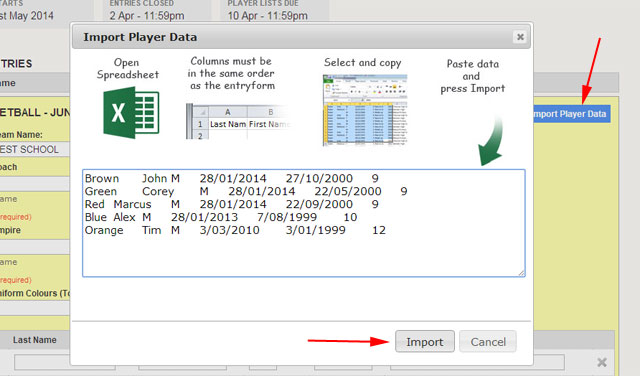
Once you have exported the data to excel, rearrange the columns to match the entry form, then select the data, copy and click on Import Player Data in EnterNOW